Misc7788
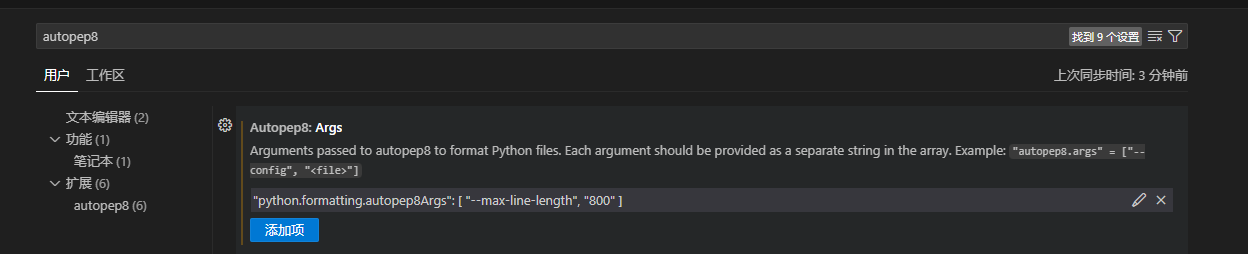
禁用python 格式化换行 - autopep8
1
"python.formatting.autopep8Args": [         "--max-line-length",         "800"     ]
Git常见全局设置
统一换行符
1
git config --global core.autocrlf input
长路径支持
1
git config --global core.longpaths true
Java8 Window安装
>> Java SE Development Kit 8 Downloads
Window 安装点击下一步没有反应
解决方案: 将系统输入法改为系统自带的输入法 !!!
Visual Studio 跳转当前打开文件到解决方案资源管理器中
- ctr + S + [
Visual Studio 2022(VS2022) key
Pro: » officeapps URL
NXXPC-Q94CK-YJYWC-JTQVW-9TR8XTD244-P4NB7-YQ6XK-Y8MMM-YWV2J
Enterprise: » officeapps URL
VHF9H-NXBBB-638P6-6JHCY-88JWHRT8M4-FNKYB-934F7-6R287-T3FB8
Mac M芯片兼容 - bad cpu type in executable
https://support.apple.com/zh-cn/102527
1
softwareupdate --install-rosetta --agree-to-license
Mac 权限 - library load disallowed by system policy / not load xxx / cannot run xx
常见问题&处理方式
可能在别的地方解压,然后拷贝传输解压后的目录引起的
- 重新下载或找到原始zip,在本Mac上双击解压,然后重新运行
找到对应的可执行程序,双击运行,这时会弹个安全权限的提示框,同意后再关掉对应打开的窗口应该就能正常执行了
终端执行
1
sudo xattr -r -d com.apple.quarantine xxx/
尝试关闭SIP
查看SIP状态
在终端中输入
1
csrutil status
就可以看到是enabled还是disabled。
如何关闭SIP
- 重启MAC,按住cmd+R直到屏幕上出现苹果的标志和进度条,进入Recovery模式
在屏幕最上方的工具栏找到实用工具(左数第3个),打开终端,输入:
1
csrutil disable
- 关掉终端,重启MAC
- 重启以后可以在终端中查看状态确认
Mac brew install nvm
配置所需的环境变量
1
2
3
4
5
brew install nvm
echo 'export NVM_DIR="$HOME/.nvm"' >> ~/.zshrc
echo '[ -s "$(brew --prefix nvm)/nvm.sh" ] && \. "$(brew --prefix nvm)/nvm.sh"' >> ~/.zshrc
echo '[ -s "$(brew --prefix nvm)/etc/bash_completion.d/nvm" ] && \. "$(brew --prefix nvm)/etc/bash_completion.d/nvm"' >> ~/.zshrc
source ~/.zshrc
Mac shell 解锁钥匙串
1
security unlock-keychain -p <your_passworld> login.keychain
Windows11 恢复完整右键经典菜单
1
2
3
reg add "HKCU\Software\Classes\CLSID\{86ca1aa0-34aa-4e8b-a509-50c905bae2a2}\InprocServer32" /f
taskkill /F /IM explorer.exe
explorer.exe
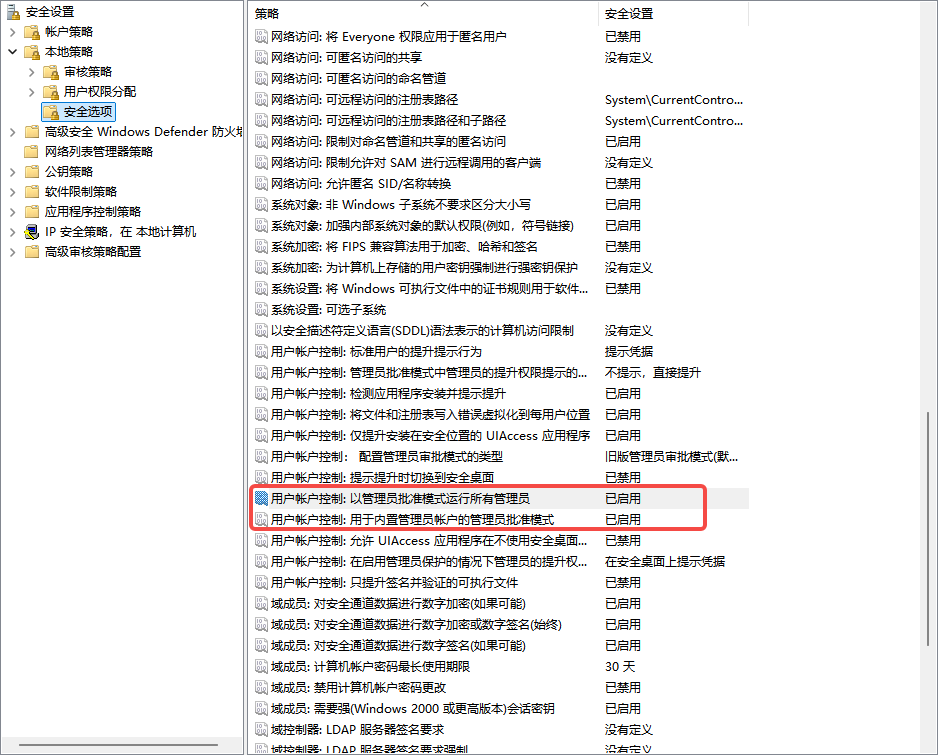
Win11系统下怎么让所有程序都默认以管理员身份运行
1
reg add "HKEY_LOCAL_MACHINE\SOFTWARE\Microsoft\Windows\CurrentVersion\Policies\System" /v EnableLUA /t REG_DWORD /d 0 /f
1
secpol.msc
Win11 解除路径长度限制
1
reg add "HKLM\SYSTEM\CurrentControlSet\Control\FileSystem" /v LongPathsEnabled /t REG_DWORD /d 1 /f
gpedit.msc- 计算机配置 - 管理模板 - 系统 - 文件系统 - 启用Win32长路径
Unity Hub
https://unity.com/unity-hub/release-notes
- https://public-cdn.cloud.unity3d.com/hub/prod/UnityHubSetup.dmg
- https://public-cdn.cloud.unity3d.com/hub/prod/UnityHubSetup.exe
1
https://unity.com/releases/editor/whats-new/2022.3.62f2#installs
取消Mac密码修改限制
1
pwpolicy -clearaccountpolicies
Widow bash Md5
1
CertUtil -hashfile yourFileName MD5
禁用 Window 更新
1
2
net stop wuauserv 2>nul
sc config wuauserv start=disabled
1
2
3
4
5
6
7
8
9
10
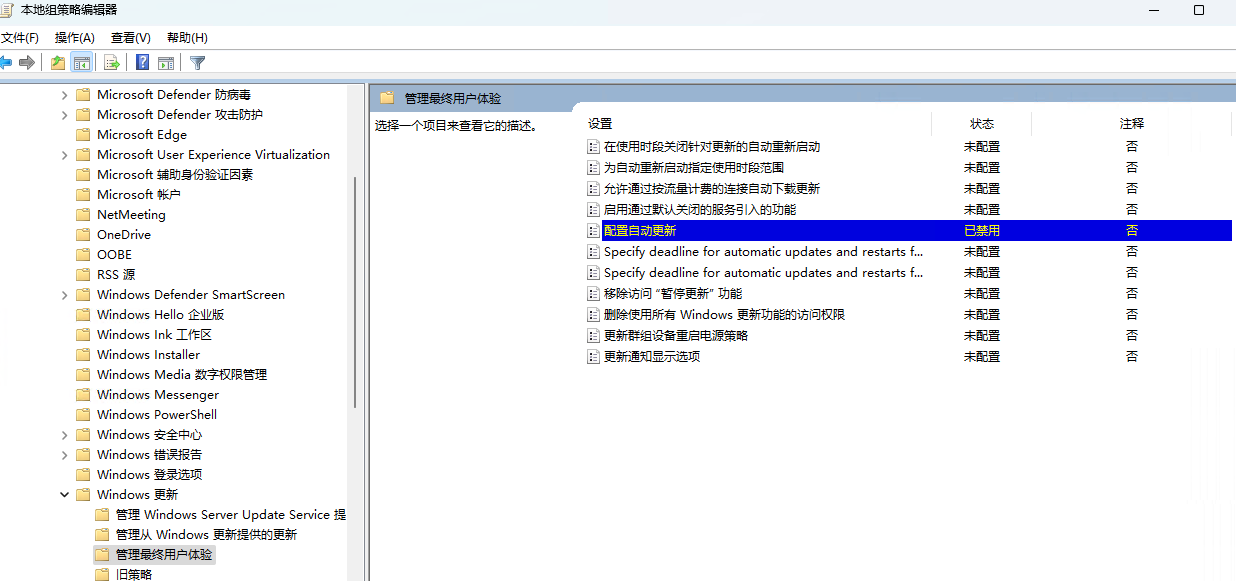
方法二:组策略编辑器(仅限专业版/企业版)
按 Win + R,输入 gpedit.msc,回车。

导航至:

复制
计算机配置 → 管理模板 → Windows组件 → Windows更新
双击 配置自动更新,选择 已禁用,保存。

继续找到 删除使用所有Windows更新功能的访问权限,启用并保存。
Windows 右击没有新建文本文件
- 新建
txtfile.reg
1
2
3
4
5
6
7
Windows Registry Editor Version 5.00
[HKEY_CLASSES_ROOT\.txt]
@="txtfile"
"PerceivedType"="text"
"Content Type"="text/plain"
[HKEY_CLASSES_ROOT\.txt\ShellNew]
"NullFile"=""
Unity PackageManager
1
2
3
4
5
6
An error occurred while resolving packages:
  Project has invalid dependencies:
    com.code-philosophy.hybridclr: Error when executing git command. fatal: could not read Username for 'https://git.lhp-cdn-game.online': terminal prompts disabled

    You may need to set up a Git credentials helper
    to access a private repository.
1
2
git config --global credential.helper 'store --file ~/.git-credentials'
echo "https://${GIT_CREDENTIALS_USR}:${GIT_CREDENTIALS_PSW}@git.lhp-cdn-game.online" > ~/.git-credentials
Mac 可执行文件提权
1
2
3
4
5
6
7
8
# 给文件添加执行权限
chmod +x filename

# 或者给所有.sh文件添加执行权限
chmod +x *.sh

# 递归给目录下所有文件添加执行权限
chmod -R +x directory/
Git设置可执行文件
1
git update-index --chmod=+x /Users/junqiangzhu/Documents/z-clientci/Bin/gradle-7.5.1/bin/gradle
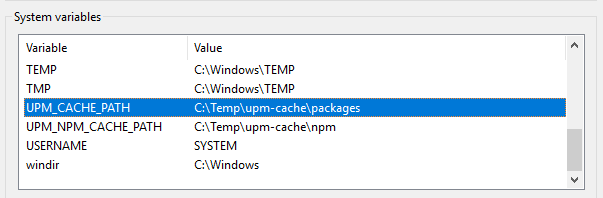
[Package Manager] Failed to start the Unity Package Manager local server process. Make sure the process
https://discussions.unity.com/t/solved-package-manager-including-missing-packages-that-break-automated-builds/685415/37
1
2
UPM_CACHE_PATH=C:\my_location\upm-cache\packages
UPM_NPM_CACHE_PATH=C:\my_location\upm-cache\npm
增加 Windows 服务可以生成的子进程的最大数量 - 桌面堆限制
WARNING: this affects the desktop heap of all services! Do not make it larger than necessary or you will push the system to consume more resource and you may bump up against problems in the total available desktop heap size.
If you find that you cannot open more than about 100 total projects, even on a very large RAM server, you may have run into a limit of the Windows “desktop heap size”.
The problem is that service sessions under windows (where the services run) have less of this “desktop heap” space available for creating windows.
The short version is:
- Services get smaller desktop heaps than interactive sessions.
- Desktop heap size limits the number of windows
- Each sub-server creates one or more “windows” even if we can’t see them.
Solution:
Backup your registry before making any changes!
Run regedit.exe as administrator
Edit the registry value:
1
HKEY_LOCAL_MACHINE\System\CurrentControlSet\Control\Session Manager\SubSystems\Windows
You will see a string like:
1
%SystemRoot%\system32\csrss.exe ObjectDirectory=\Windows SharedSection=1024,20480,768 Windows=On SubSystemType=Windows ServerDll=basesrv,1 ServerDll=winsrv:UserServerDllInitialization,3 ServerDll=winsrv:ConServerDllInitialization,2 ServerDll=sxssrv,4 ProfileControl=Off MaxRequestThreads=16
The critical bit is:
1
SharedSection=1024,20480,768
The second number (20480) is the size for interactive sessions. The third number (768) is the size of non-interactive (services) sessions. Note how the third number is 26x smaller than the second. Experimentally, we found that changing this to:
1
SharedSection=1024,20480,2048
Increased the project limit from 106 to 270, almost perfectly scaling with the heap size. Pick a value that reflects the maximum number of projects that you expect to be opened simultaneously by all users on the system. Do not make this value larger than necessary, and no larger than 8192, as each service in your system will consume more of a precious resource.